Rankticker

Product

The link building platform built around how you buy links

Rankticker is a backlink marketplace and managed service in one place. Find vetted publishers, check their risk flags, order placements with content written or reviewed by editors, then track every link and what it did for your site.

Open the marketplaceSee pricing

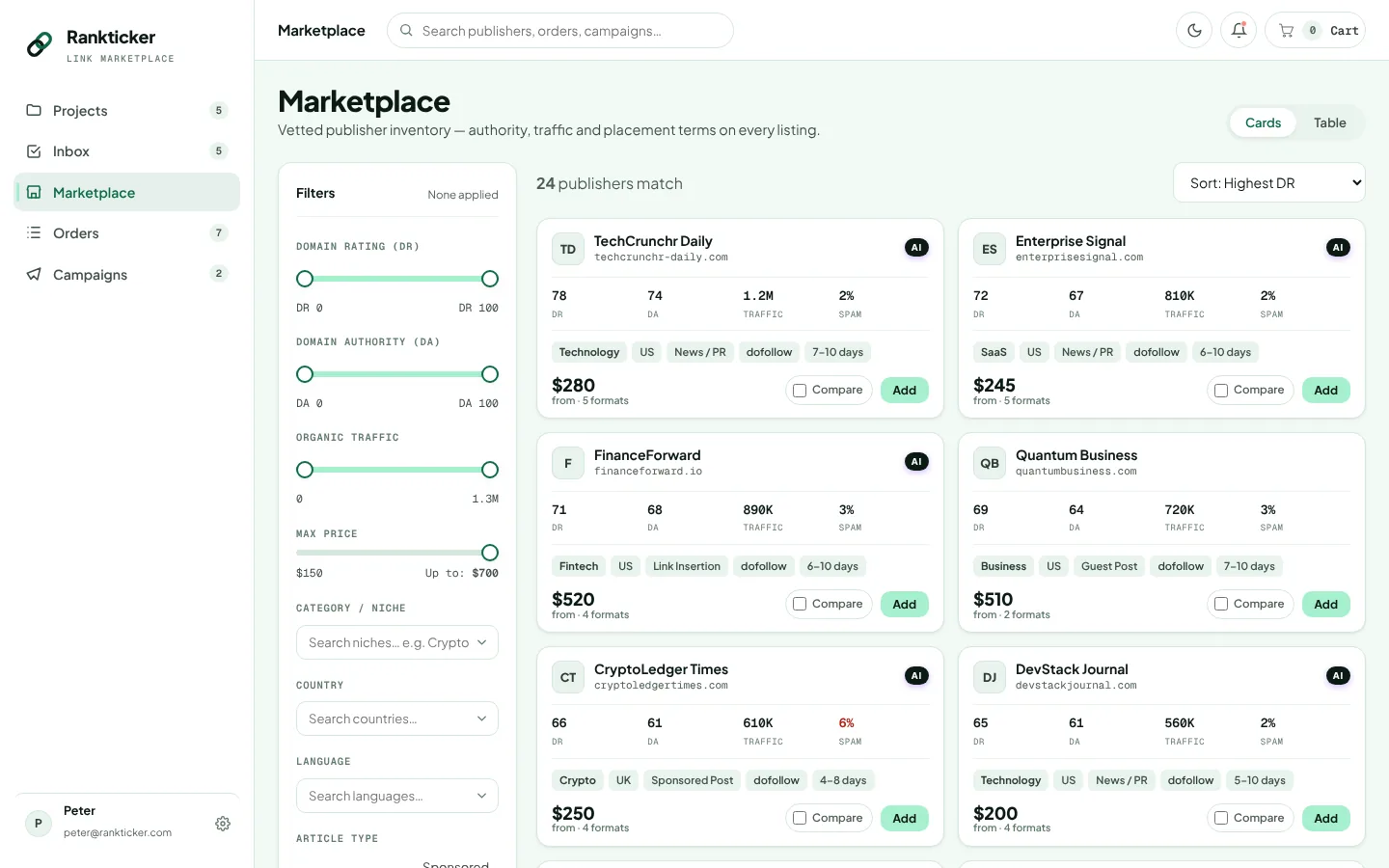
The Rankticker marketplace: publisher listings with DR, traffic, niche and price, plus filters

How it fits together

Five stages, in the order you already buy links

Anyone who has bought placements for a while runs the same loop: find a site, check it properly, order, wait for it to go live, then try to work out whether it was worth it. Rankticker puts each of those stages in one app.

  1. Find and check publishers

    Filter the marketplace by the metrics you trust, then open a profile and read its risk flags before you spend anything.

  2. Configure and order

    Set the target URL, anchor, link attribute and content options for each placement, then pay one invoice for the whole cart.

  3. Write, review, publish

    Our editors write the content or you supply it. A chief editor and the publisher both review it, and you see every stage in order tracking.

  4. Keep checking the link

    After it goes live, the live link tracker keeps testing the page, the anchor, the attribute and indexation.

  5. Scale, then measure

    Run campaigns on a monthly budget, act on recommendations, and follow SEO, AI visibility and spend over time.

Paid links and Google

Where we stand on Google's link spam policy

Google is clear about this, so we will be too. Its spam policies list "buying or selling links for ranking purposes" as link spam, and they name advertorials where payment is received for articles with links that pass ranking credit. The same page says buying and selling links is a normal part of advertising, and that such links are not a violation when they carry rel="nofollow" or rel="sponsored". Google's guidance on qualifying outbound links asks for sponsored on paid placements and still accepts nofollow.

So we don't call any link "Google-safe", we don't sell anything as undetectable, and we never promise rankings. You choose the link attribute on every placement, and each listing tells you whether the publisher labels the article as paid.

What a good placement does give you is an article on a publication your buyers actually read. That means referral visits, your brand in front of a relevant audience, a topical association between your site and your niche, and a page that AI assistants may quote when someone asks about your category. Our longer write-up is in paid links and Google's spam policies.

Marketplace

A backlink marketplace you can filter the way you shortlist

Every publisher in the marketplace has passed our review and lists a fixed price per format. You filter, compare, and buy at the price on the listing.

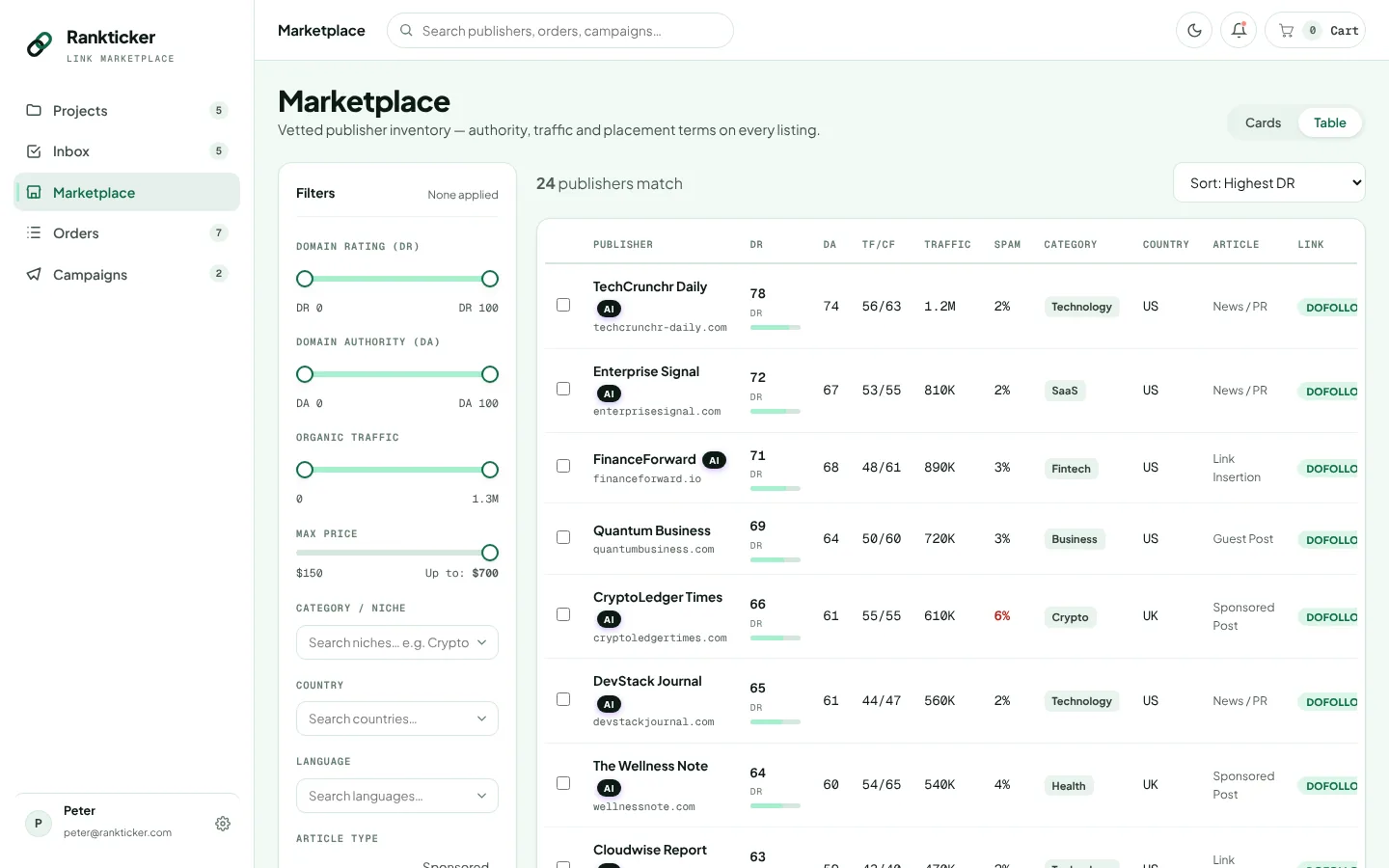
The filters cover roughly what an SEO team puts in a prospecting spreadsheet: Domain Rating, Domain Authority, organic traffic, max price, category, country, language, article type and link type (dofollow, nofollow or sponsored). Card view is good for browsing a niche. Table view is faster once you know what you want, because DR, DA, TF/CF, traffic, spam score, category, country, article type and link type sit in one row and you can scan down the columns.

Each listing also shows turnaround and a "from" price. Listings with an AI badge are publications we have verified as sources that AI models cite: ChatGPT, Google AI Overviews, Perplexity, Gemini, Copilot or Claude. That matters if part of your goal is AI visibility, since a placement on a site those systems already quote has a better chance of turning up in an answer.

You can put publishers side by side and compare their metrics, terms and prices per format before you add anything to the cart.

Rankticker marketplace in table view with columns for DR, DA, TF/CF, organic traffic, spam score, category, country, article type and link type
Table view puts the numbers you sort by in one row per publisher.

A note on the numbers

The metrics are third-party scores and each one measures something narrow. Ahrefs describes Domain Rating as the strength of a site's backlink profile relative to others in its database, on a 100-point scale. Majestic's Trust Flow scores a site by how close its links sit to a set of trusted seed sites, and Citation Flow measures link volume and "power". None of them tells you whether real people read the site or whether it covers your subject.

We'd take a DR 45 site that writes about your exact topic and gets steady search traffic over a DR 75 general news site that publishes anything for a fee. That is why the marketplace shows traffic, category and spam score next to DR, and why the profile goes further. There's more on this trade-off in topical relevance vs Domain Rating.

Vetting

How publishers are vetted, and the risk flags you see

A site is reviewed before it is listed. The publisher profile then shows what the review found, including the things that count against the site.

Plenty of marketplaces show a DR and a price and leave it there. We think that's how people end up on link farms. So every publisher profile carries risk flags, and they are there so you can see them before you pay, even when they make a listing look worse.

We look at the same things an experienced link builder checks by hand. In a 2025 survey of 518 SEO professionals run by the agency Editorial.Link and reported by Search Engine Land, 89% said they avoid sites with spammy outbound links and 86.3% called low-quality content a dealbreaker. In our experience those two checks catch most bad sites, and both are on the profile.

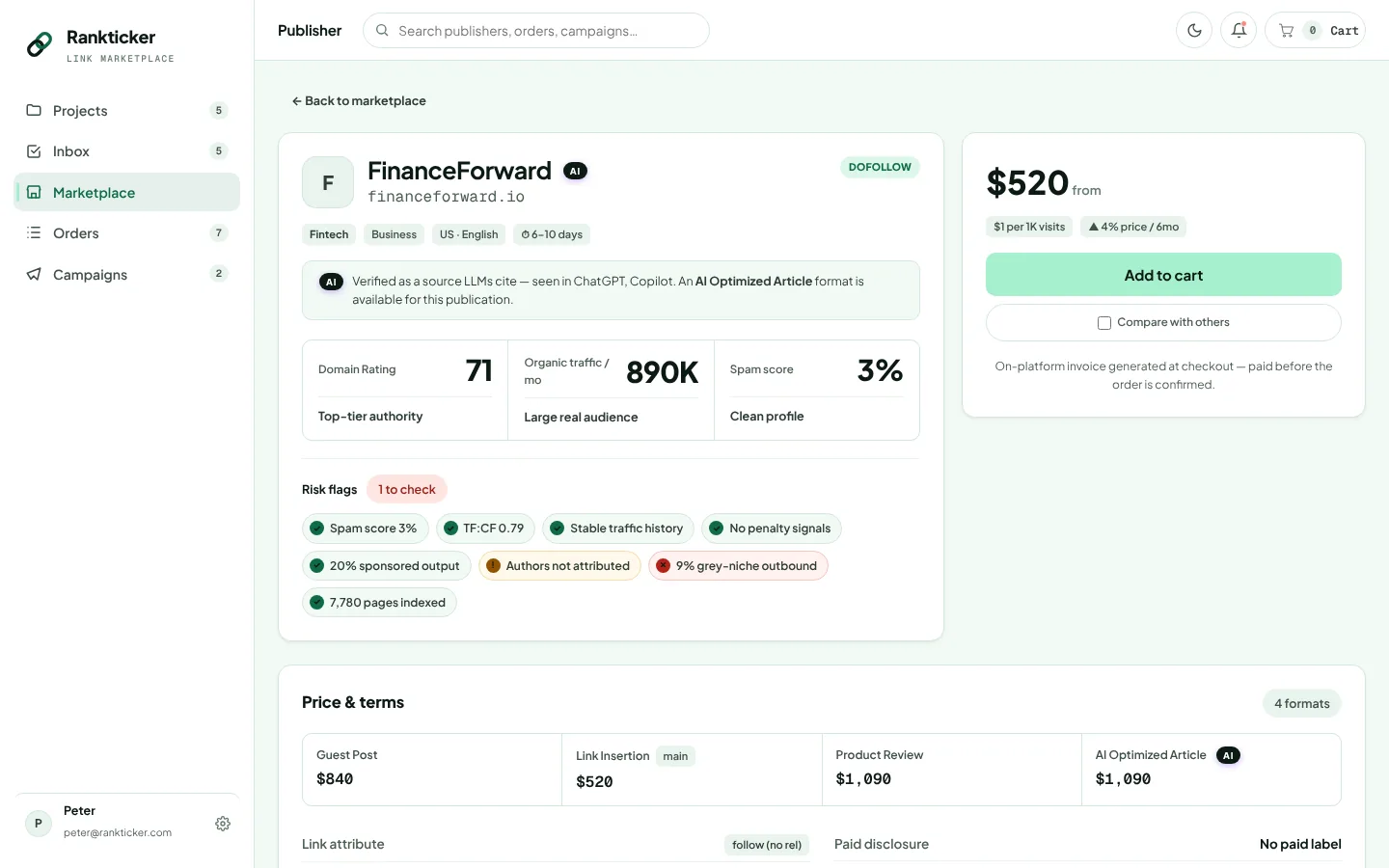
The profile also lists the price and terms for each format the publisher sells: link attribute, links per post, anchor policy, link permanence, indexing guarantee, word count, images, revisions, whether paid disclosure is shown, the publisher's policy on AI-assisted content, time to live, who writes the content and whether grey niches are accepted.

Rankticker publisher profile showing site metrics, a risk flags panel and price and terms for guest post, link insertion, product review and AI Optimized Article
The publisher profile: metrics, risk flags, and terms per format.
Risk flagWhat it measuresWhat it tells you
Spam scoreHow many traits the site shares with sites that have been penalised or bannedA high score doesn't prove anything, but it is a reason to open the site and read it
TF:CF ratioTrust Flow against Citation FlowCF far above TF usually means lots of links from low-trust sources
Traffic trendOrganic traffic direction over recent monthsA steep fall can follow a Google update hitting the site; a sudden spike can mean bought or bot traffic
Sponsored-outbound shareHow much of the site's outbound linking comes from paid articlesSites that exist to sell links look like it, to readers and to search engines
Author attributionWhether articles carry named authorsNamed, consistent authors are a sign of a working editorial team
Grey-niche outboundLinks out to casino, CBD, payday loans, adult and similar nichesIf your brand isn't in those niches, you don't want to sit next to them
Pages indexedHow much of the site Google has in its indexA low share can mean Google is ignoring large parts of the site, and a link on an unindexed page does very little

The quality checklist we use on any site

The flags cover a lot, and the rest takes a human reading the site for ten minutes. This is the list we run, and we'd suggest you run it too, on Rankticker or anywhere else.

  • The site publishes regularly on your subject, and the section your article lands in fits your page.
  • Organic traffic is steady or growing, and it comes from the countries you sell to.
  • Trust Flow is reasonably close to Citation Flow.
  • Only a small share of articles exist to carry paid links, and none link to grey niches unless that's your market.
  • Articles have named authors with a visible history on the site.
  • Most of the site's pages are indexed, and recent articles get indexed within days.
  • The writing is edited, has images, and links out to sources a reader would find useful.
  • Your link sits in the body of the article, near text about the same thing. Footers, sidebars and "partners" pages don't count.
  • The anchor policy, link attribute, permanence and indexing terms are written down before you pay.
  • You'd be happy for a customer to find the article.

For the long version, with examples of what fails, read how to evaluate a backlink in 2026.

Ordering

Six placement formats, each configured on its own

Pick the format that matches the job, then set the target, anchor and content per placement. Each line in the cart is one link with its own settings.

FormatWhat it's forTypical turnaroundContent source
Guest postA new article on the publisher's site, on a topic that fits both their readers and your target page. The usual choice for topical links to service, product or resource pages.Set by the publisher and shown on the listing. Usually longer than an insertion, since the article is written and reviewed twice.Rankticker editors, or you
Link insertionYour link added to an article that is already published and indexed. The page has age and sometimes traffic of its own.Usually the quickest format, as no new article is written.No new article; you choose the target and anchor
Sponsored postAn article published and labelled as sponsored. Good for brand exposure and referral traffic on news and magazine sites, with the paid relationship visible.Similar to a guest post.Rankticker editors, or you
News / PRCoverage of a launch, funding round, research or company news on news and press sections.Depends on the publication's news schedule.Rankticker editors, or you
Product reviewAn article about your product or service on a site whose readers compare products before buying.Often longer, especially if the publisher tests the product first.As stated on the listing
AI Optimized ArticleAn article on a publication AI systems already cite, written so an assistant can lift a clear answer from it: direct statements, named products and specific facts.Similar to a guest post.Rankticker editors, or you

If you're choosing between the first three, our comparison of digital PR, guest posts and link insertions covers what each is good at and where each goes wrong.

What you set for each placement

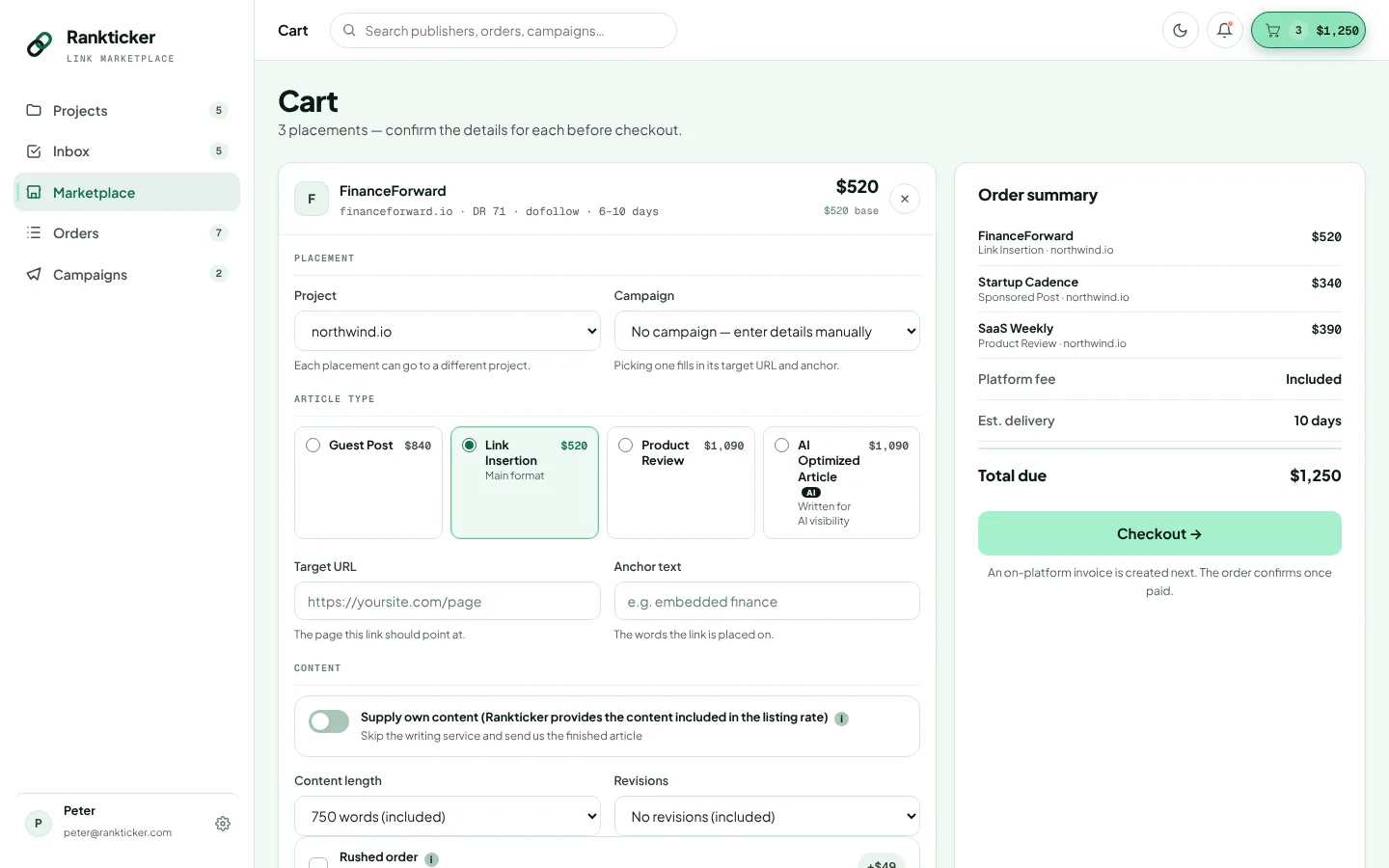
In the cart, every placement takes its own configuration:

  • the project (the website you're building links for) and, optionally, a campaign to count it against
  • article type
  • target URL and anchor text
  • whether you supply your own content
  • content length and number of revisions
  • rushed order, if the listing offers it

The listing's own terms come with it: link attribute, links per post and anchor policy. Some publishers accept exact-match anchors and some insist on branded or URL anchors. You see which before you order.

On anchors, Google's link best practices describe good anchor text as descriptive, reasonably concise and relevant to both pages, and they warn that keyword stuffing breaks the spam policies. A profile full of exact-match money anchors looks bought. Our anchor text strategy guide has the mix we'd use.

Rankticker cart with per-placement settings for project, campaign, article type, target URL, anchor text and content options, next to an order summary
Each placement in the cart has its own target, anchor and content settings.

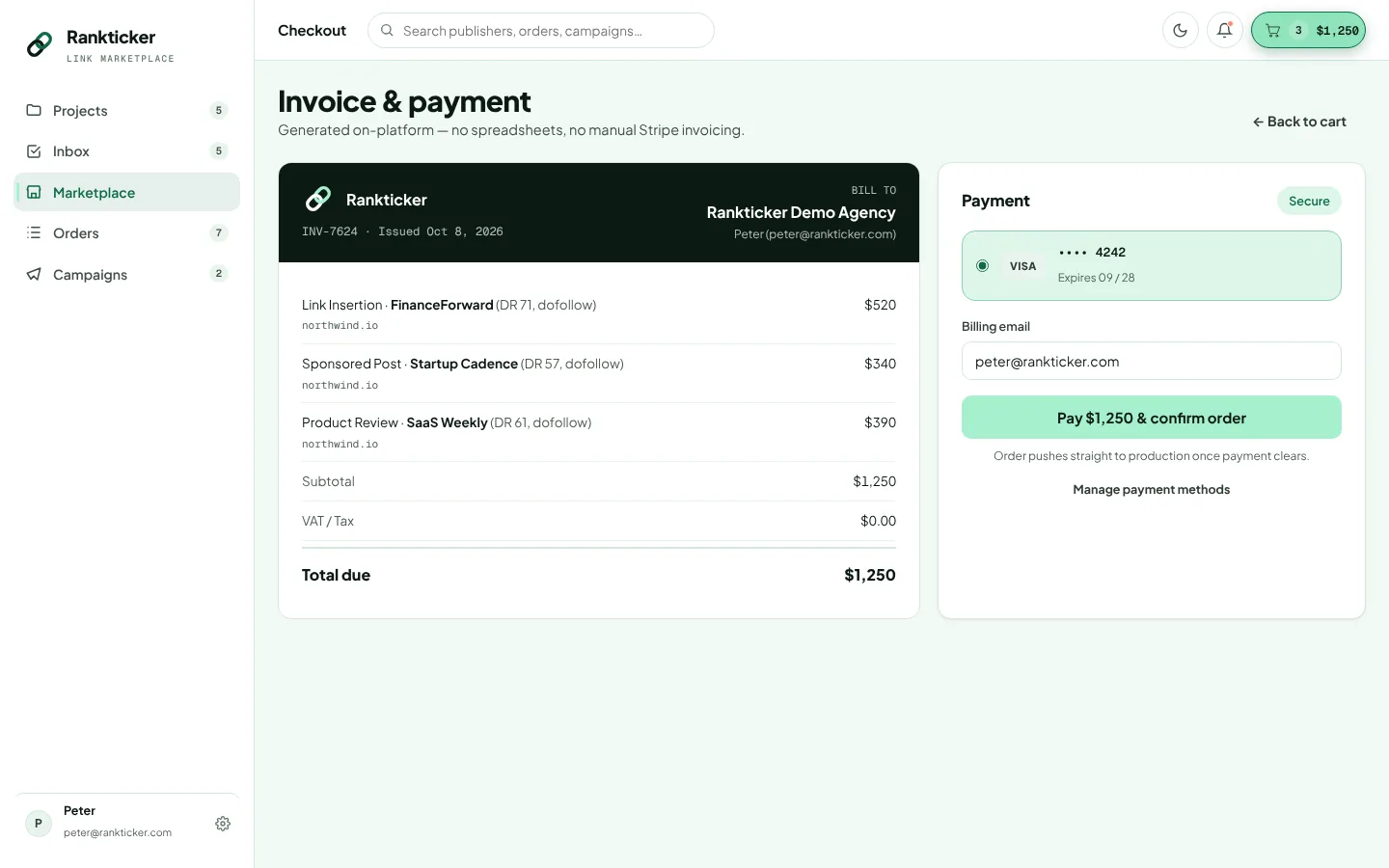
One invoice, card payment

Checkout produces an on-platform invoice for the whole cart and you pay by card. UK customers get VAT shown on the invoice. The price on each listing already includes Rankticker's fee, and content writing where the listing says content is included, so the invoice total is the sum of what you saw plus any extras you picked.

The full breakdown is on how pricing works.

Rankticker checkout showing an on-platform invoice with line items per placement and a card payment form
Checkout: one invoice for the cart, paid by card.

Content

Content written by our editors, or by you, and reviewed twice

Thin content is the fastest way to waste a good placement. Every article goes through a chief editor and then the publisher before it is published.

You have two routes. Our editors can write the article: they pick a topic that suits the publication and your target page, write it to the word count on the listing, and place your link where it reads naturally. Or you supply the text yourself, which suits teams with an in-house writer or a client who wants sign-off on every word.

Both routes go through the same timeline. A chief editor reads the draft for accuracy and checks that the link sits where a reader would expect it. Then it goes to the publisher, who can comment and ask for changes, because it's their site and their readers.

You see the article in a document editor inside the order, much like a Google Doc. You can leave comments on specific passages and request revisions. The number of revisions included depends on the listing, and you can add more when you configure the placement.

Each listing also states the publisher's policy on AI-assisted content, the word count and whether images are included, so you know what the finished article will look like before you order it.
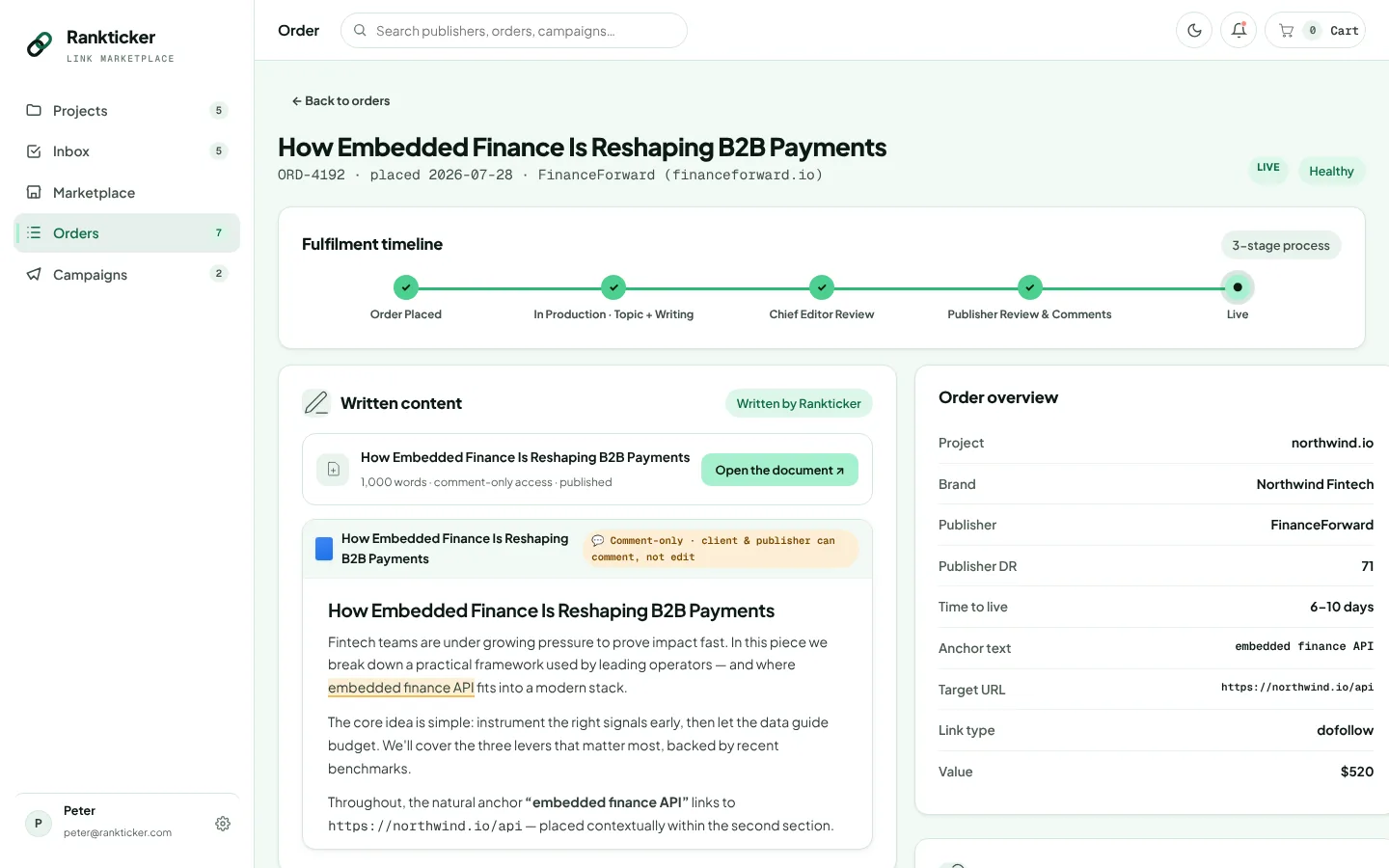
Rankticker order detail showing the article draft in a document editor with comments, beside the fulfilment timeline and order overview
The draft lives inside the order, with comments and revision requests.

Order tracking

Every order runs the same fulfilment timeline

You can see where each order is at any point, and anything waiting on you lands in your inbox.

  1. Order placed

    Payment is taken and the publisher receives the request with your target URL, anchor and brief.

  2. In production

    The topic is agreed and the article is written, or your supplied text is attached.

  3. Chief editor review

    A Rankticker chief editor checks the article and the link placement before the publisher sees it.

  4. Publisher review and comments

    The publisher reads it and asks for any changes their site needs.

  5. Live

    The article is published, the live URL is recorded, and link monitoring starts.

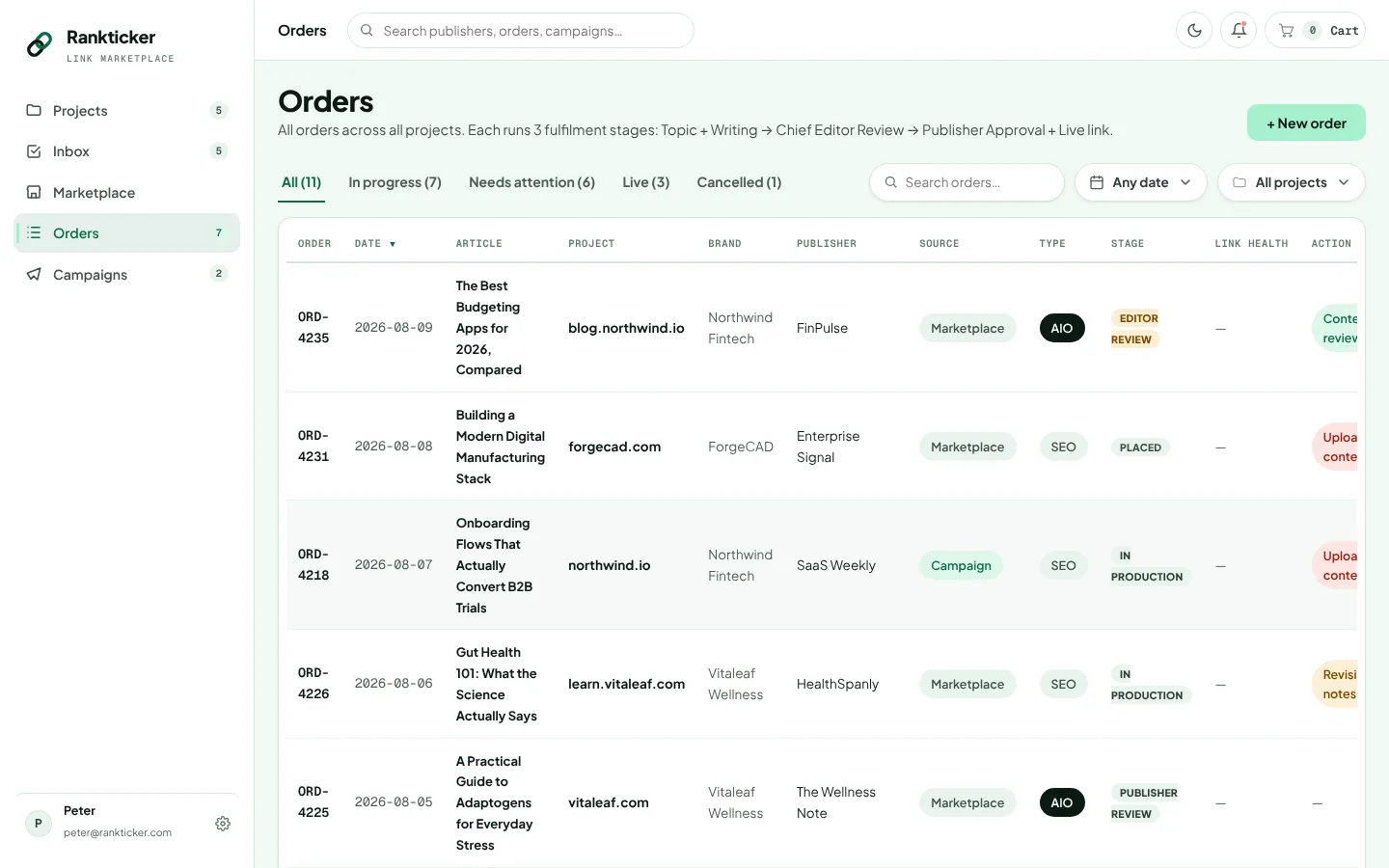
The orders list filters by status: in progress, needs attention, live and cancelled. Each row shows the current stage and the link's health, so a list of forty orders across three clients is still readable at a glance.

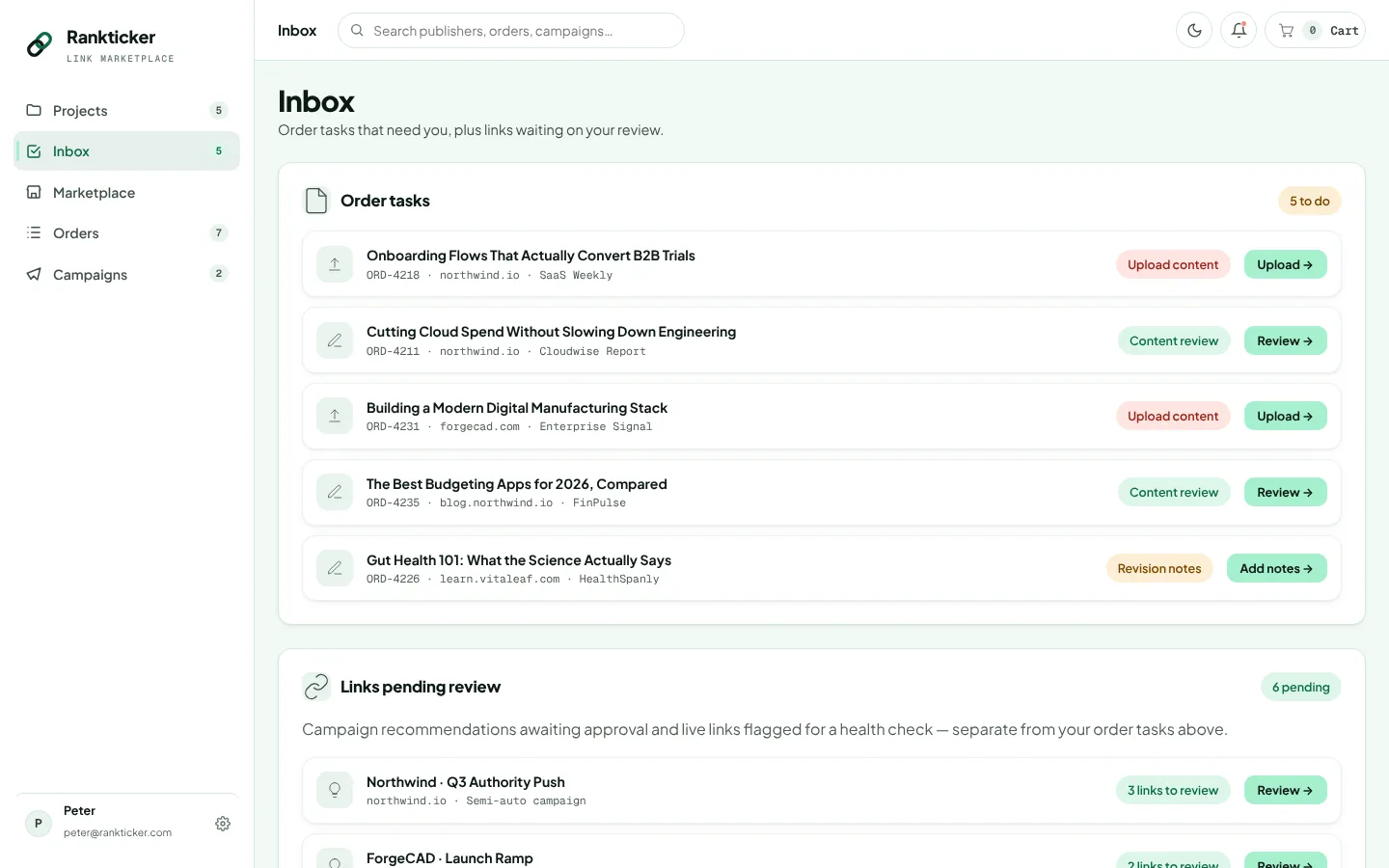
The inbox collects anything that needs a decision from you. That covers tasks like uploading content, reviewing a draft or adding notes for the writer, plus links pending review, including any the health checks have flagged. If you only check one screen in the morning, it's this one.

Rankticker inbox listing tasks that need the user, such as upload content and review content, and a list of links pending review
The inbox: tasks waiting on you and links that need a look.

Campaigns

Campaigns that buy within your rules

Ordering one link at a time works for a handful of placements. For a steady monthly programme, set a campaign and let it build the shortlist for you.

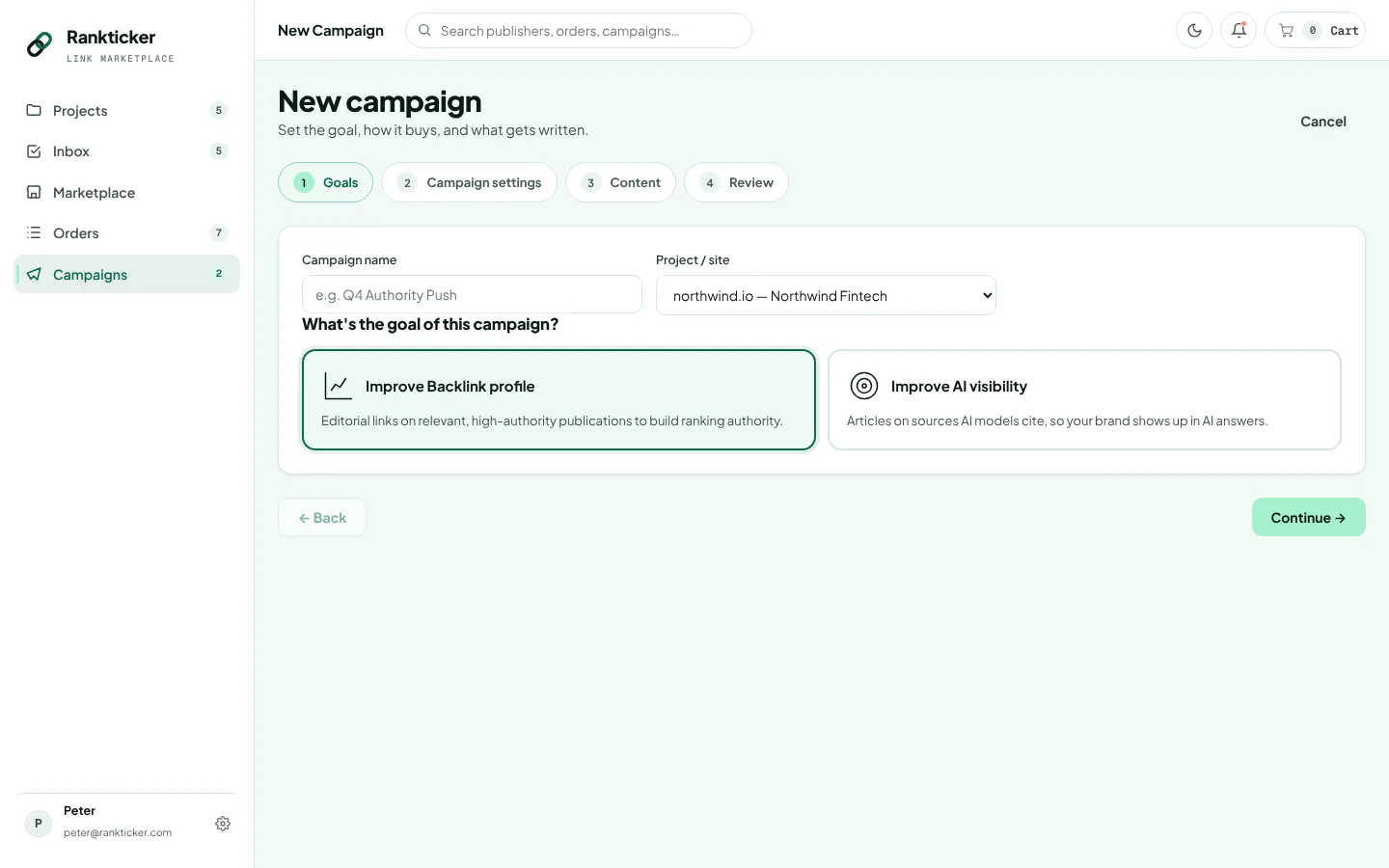
A campaign starts with a goal: improve your backlink profile, or improve AI visibility. Then you set the rules: a monthly budget, target URLs, anchors, keywords, geography, niche, a max cost per link and a brief for the writers.

The max cost per link is the setting we'd think hardest about. Set it too low and the campaign can only reach cheap sites, which is where most of the risk flags live. Set it with no ceiling and one placement can eat a month's budget. The pricing page has third-party figures on what quality placements typically cost.

Rankticker new campaign screen asking the user to choose a goal: improve backlink profile or improve AI visibility
Every campaign starts from one of two goals.

Auto

Each cycle, the system places links that fit your rules and budget without asking. It suits teams that have run a few cycles in Semi-auto, trust the selection, and want the programme to keep moving while they work on other things.

Semi-auto

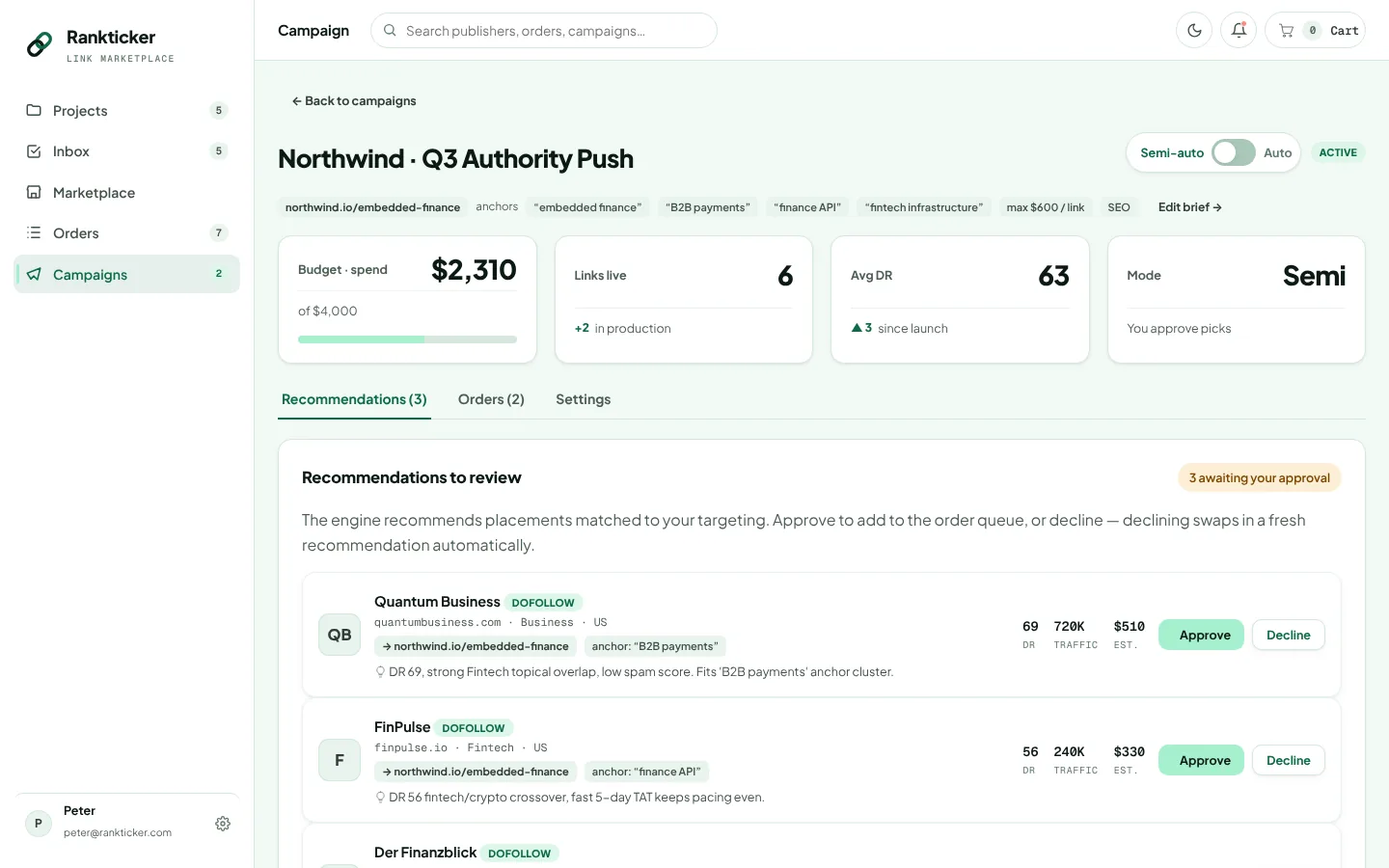
The system recommends placements and nothing is ordered until you approve. Every recommendation comes with its reasons, and you can decline any of them. We'd start every new campaign here, at least for the first month.

Recommendations

How recommendations are chosen

A recommendation is a specific publisher and format, with the reasons it was picked written next to it.

Recommendations appear in Semi-auto campaigns and on a project's SEO Performance tab. They are ranked on five things:

  • Niche overlap: how closely the publication's topics match your project and target pages.
  • Gaps in your referring domains: sites that would add a new referring domain, and topics or site types your profile is thin on, ahead of yet another link from a site that already links to you.
  • Spam score: lower is preferred, and high-risk sites are pushed down.
  • Price per DR: what you pay for the authority you get, compared with similar sites.
  • AI citation status: whether AI models cite the publication, which counts for more in campaigns with an AI visibility goal.

Each card says why in plain terms, for example "DR 69 · strong fintech topical overlap · low spam score". If the reason doesn't convince you, decline it. Declining is useful data too: it's the quickest way to find out your campaign rules are looser than you meant them to be.

Rankticker semi-auto campaign showing budget, spend, links live and average DR, with recommended placements to approve or decline and the reason for each
A Semi-auto campaign: budget and spend at the top, recommendations with reasons below.

SEO tracking

Track DR, referring domains, traffic and rankings over time

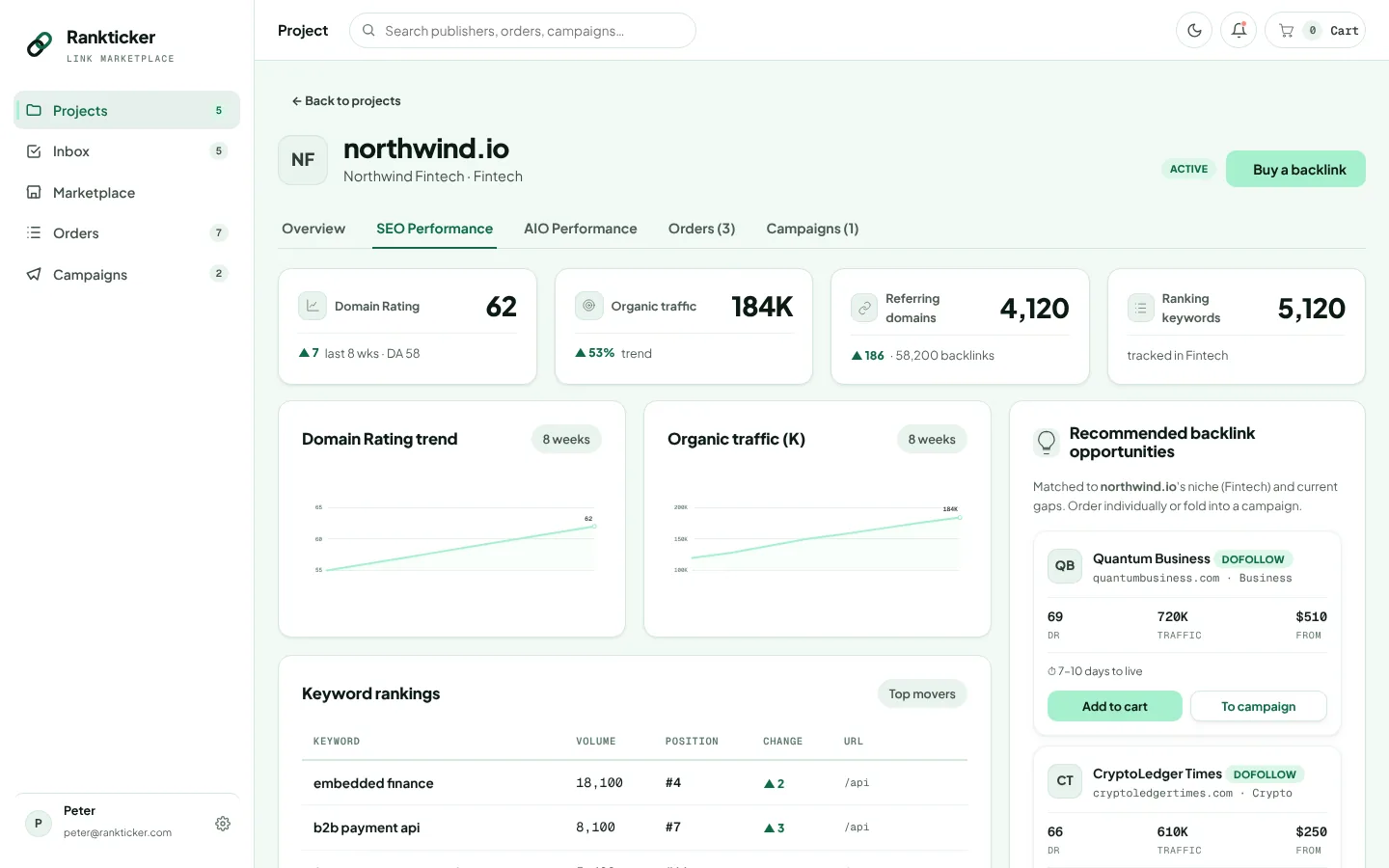
The SEO Performance tab on each project shows how your site's numbers move while you build links, so you can line the two up.

Rankticker project SEO performance tab with Domain Rating trend, organic traffic trend, referring domains, ranking keywords, keyword position changes and recommended backlink opportunities
SEO Performance: DR, traffic, referring domains and keyword positions for one project.

The tab charts your Domain Rating trend, organic traffic trend and referring domains, along with how many keywords you rank for and a keyword table with position changes. Recommended backlink opportunities sit underneath, matched to the project's niche and current gaps.

What these charts can and can't prove

Be careful with attribution here. A new link has to be crawled and counted before it can affect anything, and that usually takes weeks. Rankings also move for reasons unrelated to links: Google updates, a competitor's new page, your own content changes, seasonality. So a DR increase the month after a campaign is evidence, and that is all it is. Did the links cause it? Sometimes you can tell.

The tab puts the timeline in one place: when links went live, when referring domains changed, when traffic and positions moved. If three placements to one product page are followed by that page climbing for its target terms, and nothing else changed on the page, that's a reasonable conclusion. If everything moved at once during a core update, it isn't. Our guide to measuring link building ROI goes through how to read these numbers honestly.

AI visibility

See how often AI answers mention and cite you

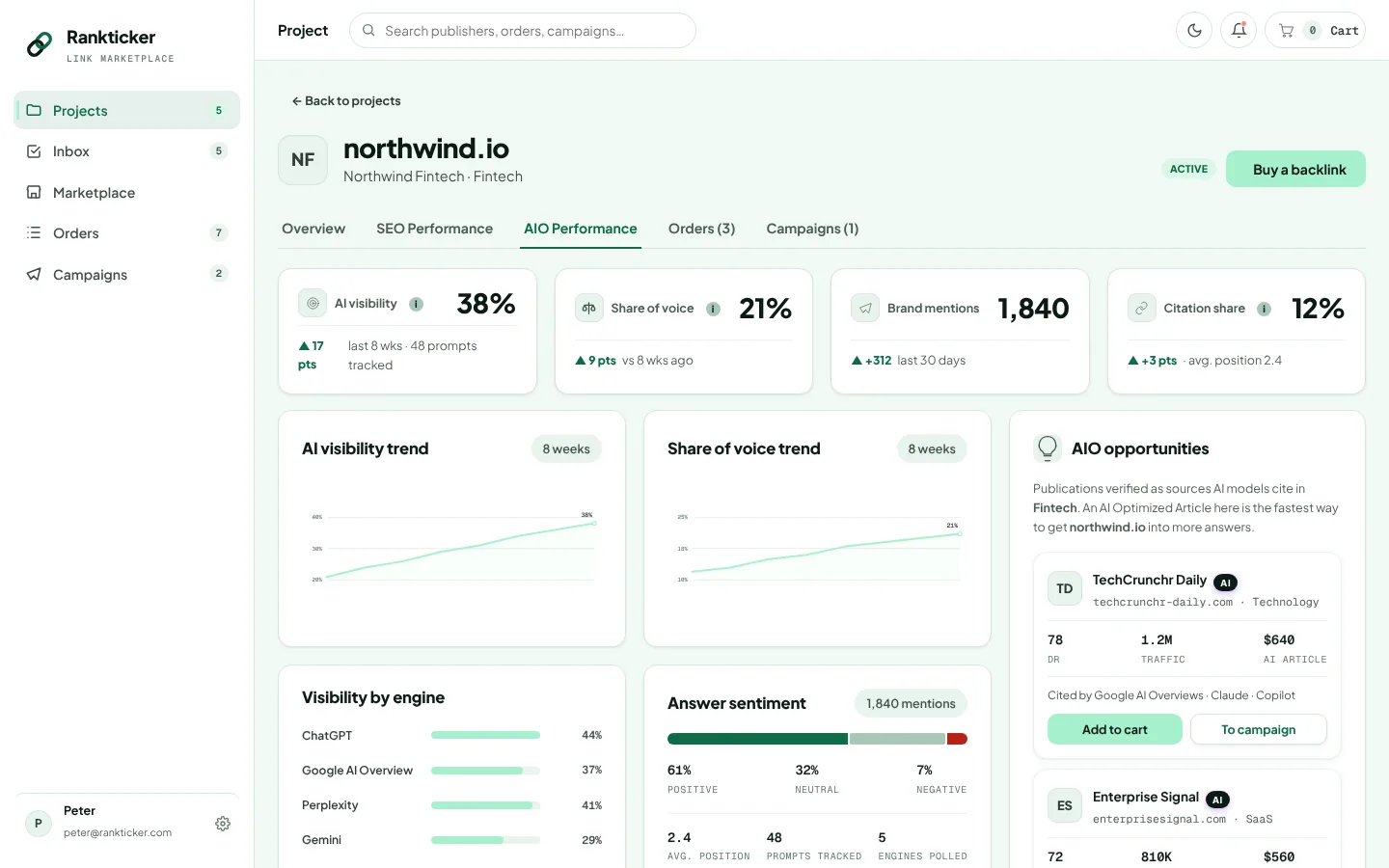
The AIO Performance tab tracks how your brand shows up in AI answers across ChatGPT, Google AI Overviews, Perplexity and Gemini: AI visibility, share of voice, brand mentions, citation share, sentiment and the prompts tracked. Its AIO opportunities list shows publications that AI models cite in your niche, which you can buy from directly.

The full explanation is on the AI visibility page.

Rankticker AIO performance tab with AI visibility percentage, share of voice, brand mentions, citation share, visibility by engine, answer sentiment and AIO opportunities
AIO Performance: visibility by engine and the publications AI models cite in your niche.

Analytics

Spend, cost per link and link health in one view

Someone will ask what the link budget bought. The project and campaign views answer that without a spreadsheet.

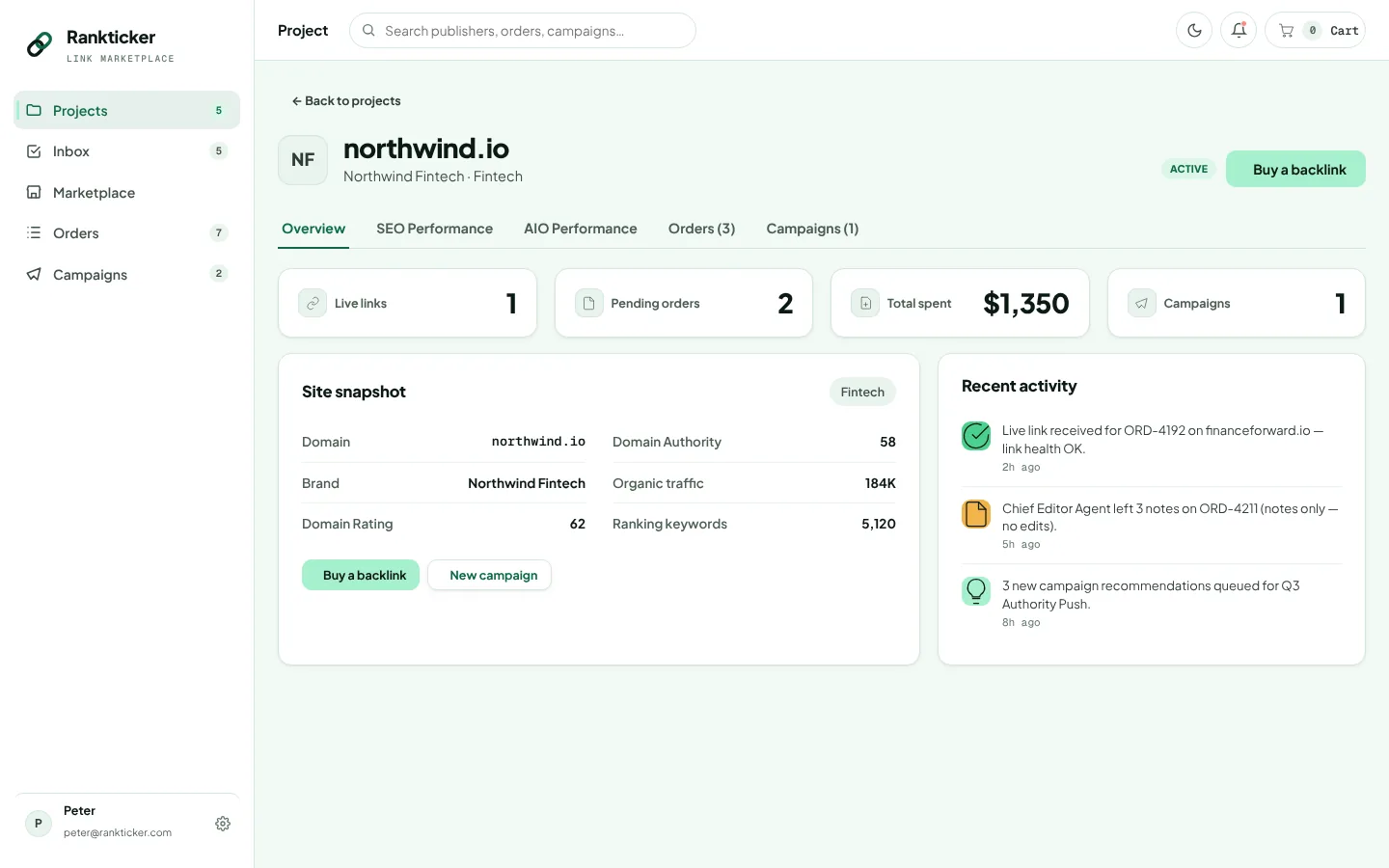
Each project overview shows live links, pending orders, spend, active campaigns, a snapshot of the site and recent activity. Campaigns add budget against spend, links live and average DR, which together give you cost per link. Link health from the tracker rolls up, so you can see how many of the links you paid for are still doing their job.

Agencies run one project per client website. Spend, orders, campaigns and tracking stay separate, which makes monthly reporting a matter of opening the right project. There's more on that set-up in link building for agencies.

Rankticker project overview with live links, pending orders, spend, campaigns, a site snapshot and recent activity
The project overview: what's live, what's pending and what it cost.

FAQ

Questions about link building platform

Is buying backlinks against Google's rules?

Google's spam policies treat links bought for ranking purposes as link spam, and they say paid links are fine when qualified with rel="sponsored" or rel="nofollow". On Rankticker you choose the link attribute on every placement, and we never describe a link as undetectable or safe from Google.

Can I choose rel="sponsored" or nofollow on a placement?

Yes. Each publisher listing states the link attributes it offers (dofollow, nofollow or sponsored) and whether paid disclosure is shown on the page. You pick the attribute when you configure the placement in your cart.

Who writes the article for a guest post or sponsored post?

Either Rankticker editors write it from your brief, or you supply your own text. In both cases the order passes a chief editor review and a publisher review before it goes live, and you can comment on the draft and request revisions.

What happens if a link is removed or changed after it goes live?

The live link tracker keeps checking each placement. If the page goes down, the anchor disappears, the link stops pointing at your target, the page drops out of the index or the attribute changes, the order's link health changes and the link shows up in your inbox for review. The permanence and indexing terms on the listing set out what the publisher committed to.

How are publishers vetted?

We review each site's traffic, link profile, outbound linking and editorial standards before it is listed, and the publisher profile shows the result as risk flags: spam score, TF:CF ratio, traffic trend, sponsored-outbound share, author attribution, grey-niche outbound links and pages indexed.

What is the difference between Auto and Semi-auto campaigns?

In Auto mode the system places links each cycle within your budget, max cost per link and other rules. In Semi-auto mode it recommends placements with a reason for each, and nothing is ordered until you approve it.

Do you guarantee rankings?

No. Rankings depend on far more than links, and nobody can promise them honestly. We show your DR, referring domains, organic traffic and keyword positions over time next to the dates your links went live, so you can judge the effect yourself.

Can an agency manage several client sites?

Yes. Each website is its own project with its own orders, campaigns, spend and SEO and AI visibility tracking, so client work stays separate.

See the publishers before you spend a penny

Filter real publications by niche, DR, traffic and price. Every metric and the full price are on the listing.