Edit a campaign's brief and quality preferences
Update the target URL, anchors, content brief, budget, pacing and the link quality thresholds every recommended publication must pass.
Open the campaign and click the Settings tab (or Edit brief → next to the campaign's tags).
Campaign brief

| Field | Notes |
|---|---|
| Optimise for | SEO (link authority and rankings), AI visibility (cited by LLMs and AI answers), or Both (the budget is split across link placements and AI Optimized Articles). |
| Target URL | Where every link in the campaign points. |
| Anchor text | A comma-separated pool. At least one is required. |
| Content brief | Sent to the writer and publisher with every order. |
| Monthly budget | At least $250. |
| Max. cost per link | Publications above this are never recommended. |
| Links per month, Pacing | How many placements to aim for, and whether to spread them evenly, front-load them or place them as soon as possible. |
| Objective | Domain Authority, Organic Traffic, Referral Traffic or Brand Mentions. |
| Target keywords | Used to score topical relevance. |
Click Save brief. Changes apply from the next placement onward; orders already placed keep their brief.
Link quality preferences
Publications that miss any threshold never enter the queue.
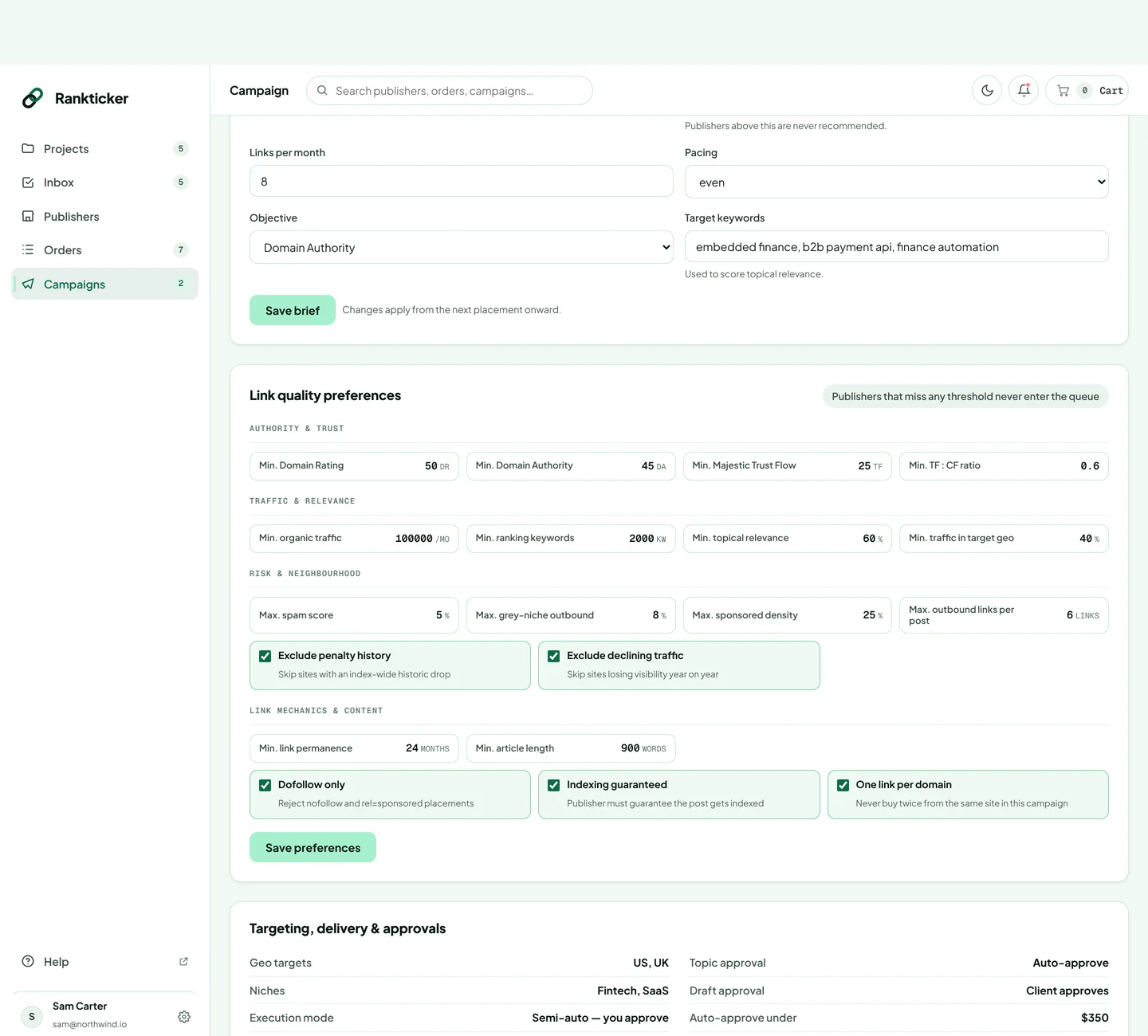
- Authority & trust: minimum DR, DA, Majestic Trust Flow and TF:CF ratio.
- Traffic & relevance: minimum organic traffic, ranking keywords, topical relevance and share of traffic in your target country.
- Risk & neighbourhood: maximum spam score, grey-niche outbound links, sponsored density and outbound links per post; exclude sites with a penalty history or declining traffic.
- Link mechanics & content: minimum permanence and article length; dofollow only, indexing guaranteed, one link per domain.
Click Save preferences.
Targeting, delivery & approvals
The last card shows the geo targets, niches, execution mode, start date, renewal, approval settings and excluded domains. Campaigns also skip domains that already link to the project. To change targeting, pause or end a campaign, email hello@rankticker.com with the campaign name.
Thanks for letting us know.
Sorry about that. Tell us what was missing at hello@rankticker.com and we'll improve it.