Read your project's Overview
What each number on a project's Overview tab means, how to change the time range, and how to use the What to do next list.
Open a project from Projects to land on its Overview tab. It answers three questions: how is the site doing, how does it compare with competitors, and what should you do next.
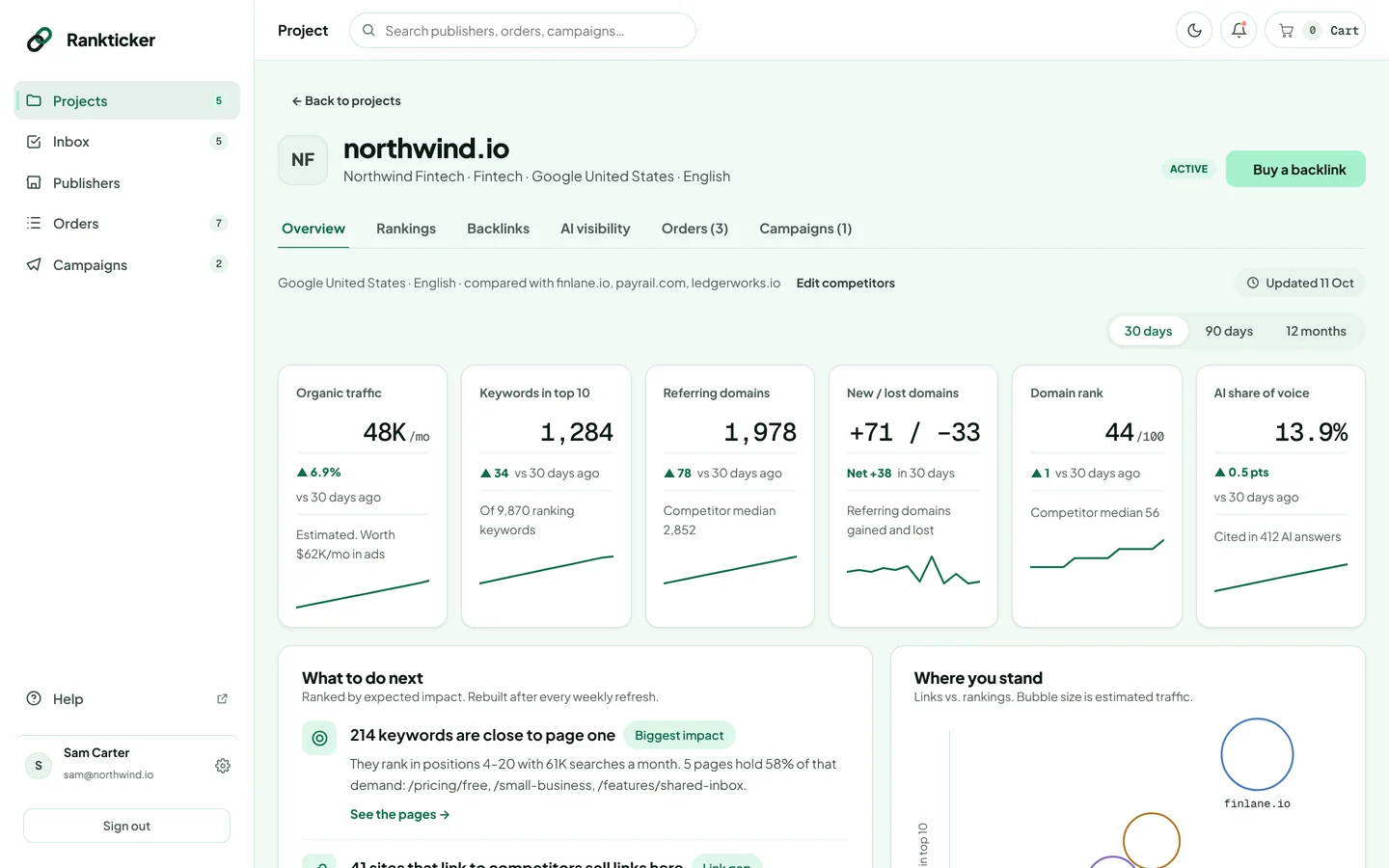
The status line
Under the tabs you'll see the market the numbers are measured in (for example Google United States · English), the competitors you're compared with and when the data was last updated. Data refreshes weekly. Click Edit competitors to change who you're compared with (how).
The six headline numbers
Use 30 days, 90 days or 12 months to change the period the changes are measured over.
| Card | What it shows |
|---|---|
| Organic traffic | Estimated monthly visits from Google search, and what that traffic would cost in ads. |
| Keywords in top 10 | How many keywords rank on page one, out of all the keywords you rank for. |
| Referring domains | How many different websites link to you, with the competitor median for comparison. See referring domain. |
| New / lost domains | Sites that started or stopped linking to you in the period, and the net change. |
| Domain rank | A 0–100 authority score from our data provider (DataForSEO). It's similar to, but not the same as, Ahrefs DR. |
| AI share of voice | How often AI answers in your topic mention you, compared with competitors. See Track your AI visibility. |
What to do next
A short list of actions ranked by expected impact and rebuilt after every weekly refresh, for example keywords that are close to page one, or sites that link to your competitors and sell links on Rankticker. Each item links to the pages or publishers it's about.
Further down the page
- Where you stand: links against rankings for you and each competitor; bubble size is estimated traffic.
- Organic traffic and Ranking positions over time.
- Referring domains vs. competitors.
- Pages that need links: pages with demand that would benefit most from new links. A good source of target URLs for your next order.
- Sites linking to competitors, not to you: a shortcut to publishers worth contacting or buying from.
Traffic, traffic value and rankings are estimates for the market you chose, not Google Search Console data. Use them to compare trends and competitors rather than as exact visit counts.
Ready to act on it? Click Buy a backlink at the top of the project to open the marketplace, or start a campaign from the Campaigns tab (more).
Thanks for letting us know.
Sorry about that. Tell us what was missing at hello@rankticker.com and we'll improve it.