Check how a publisher fits your project
The Project fit page scores a publication against every project in your workspace on topic, authority lift, risk and dofollow, and lists the orders you've already placed there.
Open a publication and click Project fit in its sidebar.
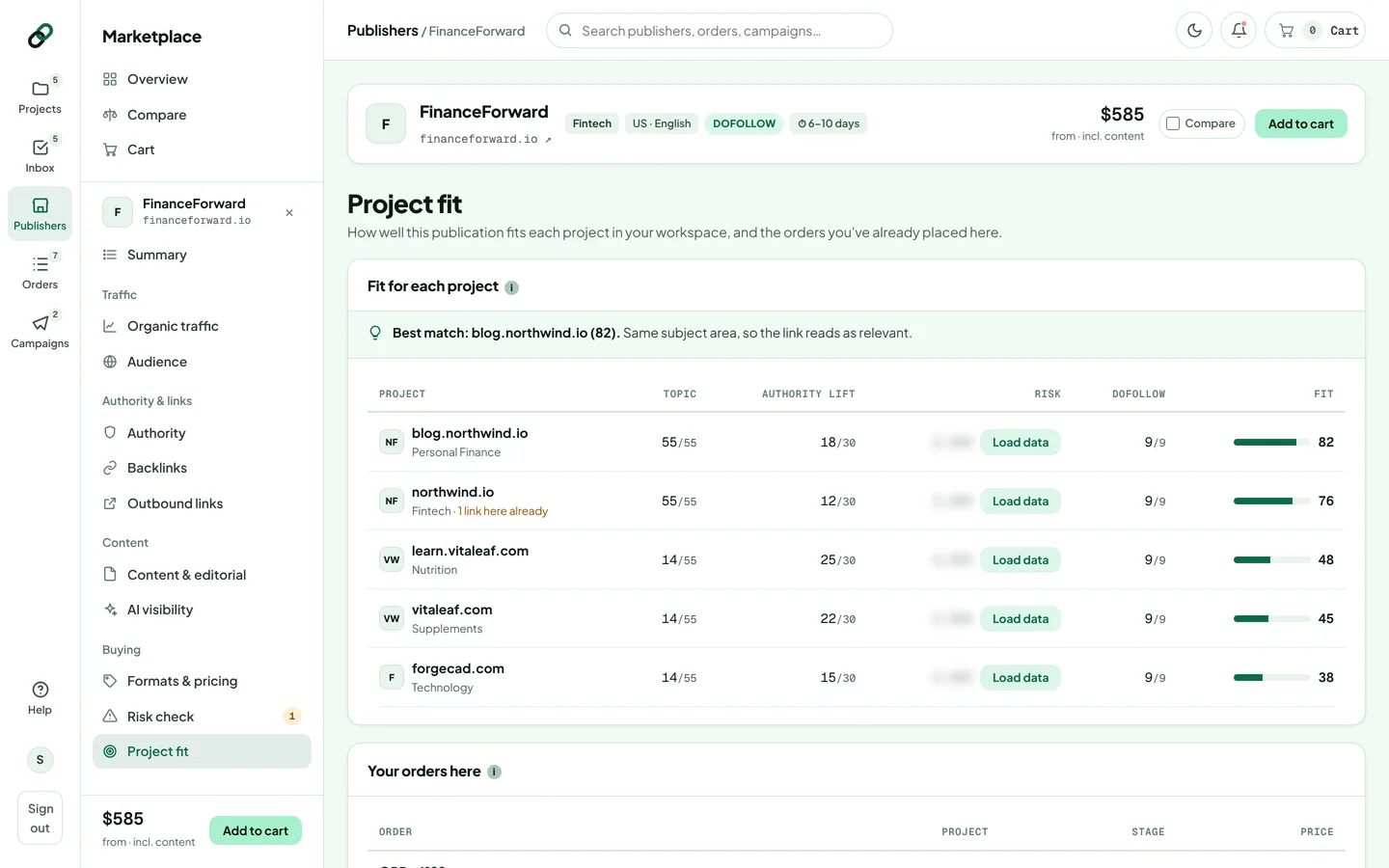
How the fit score works
Each project gets a score out of 100, made of four parts:
| Part | Points | How it's scored |
|---|---|---|
| Topic | up to 55 | Same category 55, a related category 44, anything else 14. See topical relevance. |
| Authority lift | up to 30 | How much stronger the publication is than your project. |
| Risk | up to 14 | A lower spam score scores more. Needs the backlink data loaded. |
| Dofollow | 9 | Added when the link is dofollow. |
Parts without data are left out rather than guessed. The best match is called out at the top of the table.
Your orders here
Below the scores you'll see every order you've already placed with this publication. A project that already has links here is flagged: several links from one site to the same project add less each time.
Was this article helpful?
Thanks for letting us know.
Sorry about that. Tell us what was missing at hello@rankticker.com and we'll improve it.